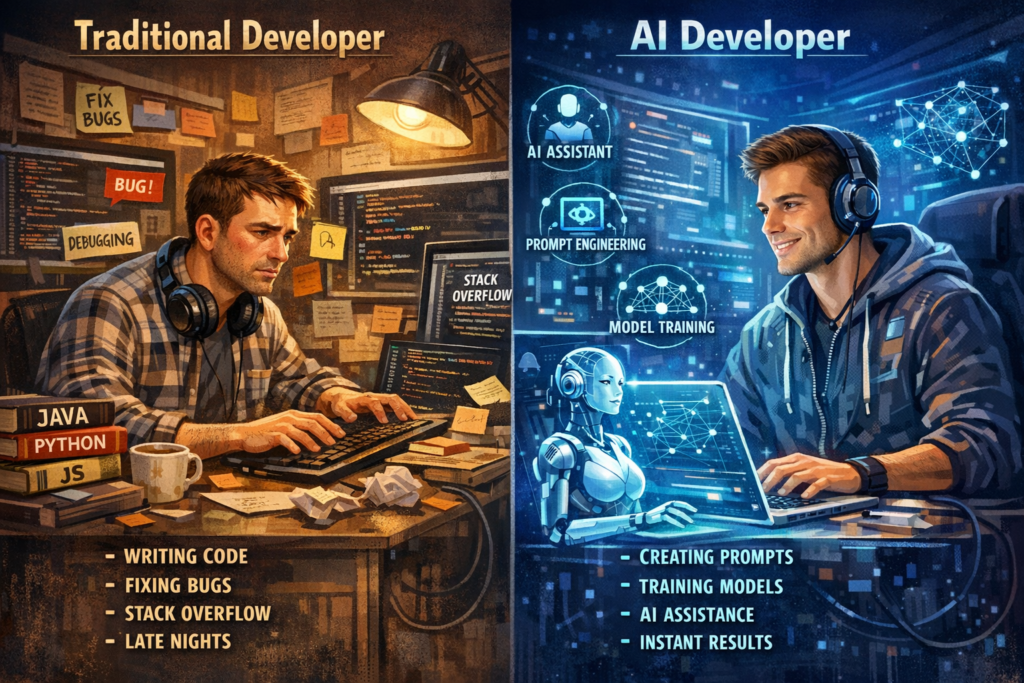
Software development is changing faster than ever before. You can now write, test, and improve code using ai tools. While this article isn’t exclusively about the ai tools for coding but the important part to understanding how to take your journey as developer to the next level.
Not long ago, developers spent hours searching documentation and debugging small errors. Today, ai tools for coding help you complete many of those tasks in minutes.
This shift is not just a small improvement. It is transforming how you learn programming, build apps, and solve technical problems. Whether you are a beginner or experienced developer, AI has become a powerful partner in the coding process.
Let’s explore how this change happened and what it means for you.
Why Ai tools For Coding Entered Programming
Programming has always required logic, patience, and problem-solving skills. Developers often repeat similar patterns when building applications. Because of this repetition, artificial intelligence became perfect for assisting developers.
AI systems learn from millions of lines of existing code. They analyze patterns, structures, and common programming solutions. When you start writing code, AI can predict what you want to build next.
This ability makes development faster and easier for many people. Instead of writing every line manually, you can receive helpful suggestions. These suggestions come from modern AI tools for coding trained on large programming datasets.
Think of it like having an experienced developer sitting beside you. The AI suggests improvements and helps prevent mistakes. You still control the project, but you receive intelligent guidance.
Click here to learn more about Artificial intelligence history
How AI Tools Are Changing the Developer Workflow
Traditional development often required several steps before finishing a feature. You would plan the logic, write the code, test it, and fix errors manually. That process still exists, but artificial intelligence is speeding everything up.
With modern AI tools for coding, you can generate code snippets almost instantly. For example, you might describe a function in plain language. The AI then produces a working version of that function.
This saves time during repetitive tasks. Developers often write similar functions many times across different projects. AI can automate those common tasks while you focus on the creative parts.
Another important change is debugging. Finding a small error in thousands of lines of code can be frustrating. AI systems can scan your code quickly and suggest possible fixes.
This means you spend less time hunting bugs and more time building useful features.
Why Developers Are Embracing AI Assistance
Many developers first felt skeptical about artificial intelligence in programming. Some worried that AI might replace developers completely. However, reality shows something different.
AI works best as an assistant rather than a replacement. You still design the system, choose the architecture, and make key decisions. AI simply helps you move faster.
Developers now use AI tools for coding to handle repetitive tasks and generate ideas. This makes projects less stressful and more enjoyable.
Another advantage is learning speed. When you are learning a new programming language, AI can explain code examples clearly. You can ask questions and receive immediate suggestions.
This interactive help makes programming more accessible for beginners. Many new developers now learn faster because AI supports them during practice.
AI Tools Is Making Coding More Accessible
In the past, programming sometimes felt intimidating for beginners. Complex syntax and unfamiliar concepts created barriers for many people.
Artificial intelligence is lowering those barriers. With AI tools for coding, you can experiment without fear of breaking things. If something goes wrong, the AI can suggest improvements.
You can also describe your idea using simple language. AI then converts that idea into real code. This approach helps beginners understand how programming logic works.
As a result, more people are exploring software development. Students, entrepreneurs, and hobbyists can now build projects without years of experience.
This accessibility is helping innovation grow across many industries.
The Growing Ecosystem of AI Coding Tools
The number of AI development tools continues to increase every year. Companies are investing heavily in artificial intelligence for programming. They want to make development faster and more efficient.
Today, you can find AI tools for coding that assist with writing code, reviewing code, and testing applications. Some tools even help generate entire project structures.
These systems are also improving quickly. New updates make them more accurate and helpful for complex tasks.
Because of this rapid improvement, developers are constantly discovering new ways to use AI. Many teams now integrate AI assistance directly into their development environments.
This trend shows that AI will remain a major part of software development.
What the Future Looks Like for Developers
Artificial intelligence will continue evolving alongside programming. Instead of replacing developers, AI will likely expand what developers can achieve.
You may soon build complex applications faster than ever before. Tasks that once required large teams could become possible for smaller groups.
Learning programming might also become easier. Future AI tools for coding could act like personal mentors, guiding you through projects step by step.
However, human creativity will still matter most. AI can generate solutions, but you decide which ideas work best. Your judgment and design thinking remain essential.
The future of development is not human versus AI. It is humans working together with intelligent tools.
10 AI Tools for Coding You Should Try
Artificial intelligence is changing how you write and improve code. Many developers now use smart assistants to work faster and avoid common mistakes. These AI tools for coding can suggest code, fix errors, and explain programming concepts.
If you are building apps, websites, or software projects, these tools can become helpful companions. They do not replace your thinking, but they make the development process smoother.
Below are ten useful tools you should explore if you want to level up your coding workflow.
1. GitHub Copilot
GitHub Copilot is one of the most popular AI tools for coding today. It works directly inside your coding editor.
When you start writing a function, the tool suggests complete lines of code automatically. You can accept the suggestion or modify it.
Copilot learns from millions of open-source repositories. Because of this training, it often understands what you want to build.
This tool is especially helpful when you are working with unfamiliar frameworks or programming languages.
2. ChatGPT
ChatGPT has become a powerful helper for developers around the world. You can ask it coding questions and receive explanations instantly.
For example, you might paste a piece of code and ask why it does not work. The AI can explain the problem and suggest improvements.
Many developers also use ChatGPT to generate small scripts, understand complex algorithms, and explore new technologies.
Among modern AI tools for coding, this one stands out because it acts like a conversational programming assistant.
3. Tabnine
Tabnine focuses on intelligent code completion. It predicts what you will type next while you are writing code.
Instead of finishing only a few characters, Tabnine can suggest entire functions. This saves time during repetitive tasks.
The tool integrates with many popular development environments. You can use it in languages like Python, JavaScript, Java, and more.
Tabnine is simple, fast, and very useful when you want smooth coding assistance.
4. Amazon CodeWhisperer
Amazon CodeWhisperer is another powerful addition to the world of AI tools for coding. It analyzes your code and generates suggestions in real time.
This tool works well for developers building cloud applications. It integrates naturally with Amazon Web Services.
CodeWhisperer can also detect potential security issues in your code. That feature helps developers avoid risky programming patterns.
Because of this, it is not only a coding assistant but also a security helper.
5. Replit Ghostwriter
Replit Ghostwriter is designed for developers who enjoy coding in the browser. It runs inside the Replit development platform.
The tool helps you write, edit, and understand code while you build projects online.
Ghostwriter can generate code, explain functions, and assist with debugging tasks. It is especially useful for beginners experimenting with small projects.
This tool shows how AI tools for coding can make cloud development easier.
6. Codeium
Codeium is gaining popularity because it offers powerful features with a free plan. Many developers appreciate its fast performance.
The tool provides autocomplete suggestions and intelligent code generation. It supports many programming languages and development environments.
Codeium focuses on improving productivity while keeping the coding experience simple.
If you want a lightweight assistant, this tool is definitely worth testing.
7. AskCodi
AskCodi is designed to help developers write code quickly and accurately. It offers several AI-powered utilities.
You can generate SQL queries, write scripts, or convert code between programming languages.
This flexibility makes AskCodi useful for both beginners and experienced programmers.
Among modern AI tools for coding, it is particularly helpful when you want quick solutions for specific tasks.
8. Codiga
Codiga focuses on improving code quality and reducing errors. It analyzes your code and suggests improvements in real time.
This tool also provides automated code reviews. That means it can detect bugs or poor coding practices before deployment.
Developers working in teams often appreciate tools like Codiga because they help maintain consistent coding standards.
It acts like a quality control system for your development process.
9. MutableAI
MutableAI is designed to accelerate development workflows. It helps generate new code and refactor existing code.
One interesting feature is its ability to transform messy code into cleaner structures.
Developers often use MutableAI to improve readability and maintainability in large projects.
This makes it one of the more specialized AI tools for coding available today.
10. Sourcery
Sourcery focuses mainly on Python developers. It analyzes your code and suggests better ways to write functions.
For example, it might simplify complicated logic or remove unnecessary lines.
This tool helps you follow best practices while keeping your code clean and efficient.
If you work with Python often, Sourcery can become a valuable part of your workflow.
Why These Ai Tools Matter for Developers
The rise of artificial intelligence in programming has created many opportunities for developers. These tools are not just about speed. They also improve learning and experimentation.
When you use AI tools for coding, you receive instant feedback on your work. This feedback helps you understand programming concepts more clearly.
You can also explore new languages and frameworks with greater confidence. AI assistants guide you through unfamiliar territory.
Over time, these tools help developers become more productive and creative.
How Ai Tools Improves Code Quality
Writing code is not only about making programs run. Good developers also care about clean structure, readability, and long-term stability. When your code is well written, it becomes easier to maintain and expand later.
Artificial intelligence is helping developers reach this goal faster. Many modern AI tools for coding can analyze code and suggest improvements in seconds. Instead of guessing where problems might hide, you receive smart feedback immediately.
This support allows you to focus on building features while AI helps improve the technical quality of your code.
Smarter Error Detection
Every developer encounters bugs. Even experienced programmers miss small mistakes while writing complex logic. These errors can slow down development and create frustration.
AI systems help reduce this problem by detecting issues early. Many AI tools for coding scan your code while you type. They look for patterns that often cause errors.
For example, the AI may notice an unused variable or incorrect function structure. It can highlight the problem and suggest a fix.
This instant feedback saves valuable time. Instead of debugging later, you solve the issue immediately.
Another advantage is learning. When AI explains why something is wrong, you understand programming concepts more clearly. Over time, you start recognizing these mistakes yourself.
Cleaner and More Readable Code
Clean code is easier to understand and maintain. When code becomes messy, other developers struggle to follow the logic.
Artificial intelligence can help improve code readability. Some AI tools for coding analyze your code and suggest better structures.
For example, the AI might recommend shorter functions or clearer variable names. It may also reorganize complex logic into simpler steps.
These suggestions help your code become easier to read. When your project grows, clear code saves time for you and your team.
Think about reading a well-written article compared to a messy one. Clean code works the same way. When the structure is clear, everything feels easier to understand.
Faster Debugging and Problem Solving
Debugging can sometimes feel like searching for a tiny needle in a large haystack. One small error can stop an entire program.
Artificial intelligence helps developers find those problems faster. Many AI tools for coding analyze error messages and compare them with known solutions.
Instead of searching the internet for hours, you receive useful suggestions immediately. The AI can explain what might be wrong and recommend a possible fix.
This speeds up development and reduces frustration. You spend less time stuck on technical issues and more time building useful features.
For beginners, this support is especially valuable. AI tools can guide you through debugging steps that might otherwise feel confusing.
Automatic Code Refactoring
Refactoring means improving existing code without changing how it works. Developers often refactor code to make it cleaner and more efficient.
Artificial intelligence makes this process much easier. Some AI tools for coding automatically suggest better ways to structure your code.
For example, the AI may replace repetitive logic with reusable functions. It might also simplify complicated expressions.
These improvements make your program easier to maintain. They also reduce the risk of future bugs.
Refactoring used to require careful manual analysis. With AI assistance, you can perform these improvements much faster.
Stronger Security in Your Code
Security is one of the most important parts of modern software development. A small vulnerability can create serious risks for applications.
Artificial intelligence can help identify risky coding patterns. Many AI tools for coding check your code against known security issues.
For example, the AI may detect unsafe database queries or weak authentication logic. It then suggests safer alternatives.
This extra layer of analysis protects your software before problems appear. Developers can fix vulnerabilities early in the development process.
Security improvements like these are becoming essential for modern applications.
Learning Better Coding Practices
Artificial intelligence is also becoming a powerful learning assistant. When you receive suggestions from AI tools for coding, you learn new techniques.
For example, the AI might recommend a more efficient algorithm or improved structure. By reviewing these suggestions, you expand your programming knowledge.
Over time, you start writing better code naturally. AI does not replace learning, but it accelerates it.
Many developers now treat AI as a coding mentor. It helps them explore better solutions and avoid common mistakes.
This learning effect makes AI valuable for beginners and experienced programmers alike.
The Balance Between AI and Human Judgment
Artificial intelligence is powerful, but it is not perfect. Developers still need to review suggestions carefully.
Sometimes the AI recommendation may not fit your project structure. Your understanding of the system helps you make the final decision.
This balance creates a productive partnership. You provide creativity and design thinking. AI provides speed and analysis.
When you combine both strengths, your code quality improves significantly.
Tips for Choosing the Right Ai Tool
Artificial intelligence has created many exciting opportunities for developers. Today, you can find dozens of helpful AI tools for coding across the internet. Each one promises faster development, smarter suggestions, and fewer bugs.
However, not every tool fits every developer. The best choice depends on your experience level, your projects, and your workflow. Choosing the right tool can improve your productivity and make coding more enjoyable.
Before you start using any assistant, it helps to understand what features truly matter. Let’s explore some practical tips to help you select the right AI coding companion.
Understand Your Coding Needs First
Before testing new tools, you should think about what you actually need. Some developers want help generating code quickly. Others want assistance with debugging or learning new programming languages.
If you are a beginner, you may prefer AI tools for coding that explain concepts clearly. Tools that provide detailed explanations can accelerate your learning process.
Experienced developers may focus more on productivity features. They might look for tools that generate functions, automate repetitive tasks, or suggest architecture improvements.
Your programming language also matters. Some AI tools work best with specific languages such as Python, JavaScript, or Java.
When you know your needs, choosing the right tool becomes much easier.
Look for Easy Integration
A good coding tool should integrate smoothly into your development environment. You should not feel forced to change your entire workflow.
Many modern AI tools for coding connect directly to popular editors like Visual Studio Code or JetBrains products. This integration allows you to receive suggestions while writing code.
If the tool runs inside your editor, you save time switching between platforms. Everything stays in one place.
Cloud-based coding environments also support AI assistance. Some developers enjoy browser-based tools because they require no installation.
Whatever you choose, the tool should feel natural in your daily development routine.
Evaluate Code Suggestions Carefully
Not every AI-generated suggestion will be perfect. Artificial intelligence predicts solutions based on patterns, not deep understanding.
Because of this, you should always review AI-generated code. Good AI tools for coding provide clear suggestions without forcing you to accept them.
When testing a tool, observe how accurate its suggestions are. Do they match your coding style? Are they easy to understand?
A helpful AI assistant should improve your workflow rather than confuse it.
Think of AI suggestions as helpful ideas, not final answers. Your judgment remains the most important factor in writing reliable software.
Check Language and Framework Support
Programming involves many languages and frameworks. Some AI assistants perform better with certain technologies.
Before committing to a tool, verify that it supports your preferred language. Many AI tools for coding work well with popular languages like Python, JavaScript, and TypeScript.
If you build mobile apps, you may need tools that support Swift or Kotlin. Backend developers might prefer tools optimized for Java or Go.
Framework support also matters. Developers working with React, Django, or Node.js benefit from tools familiar with those frameworks.
Choosing a compatible tool ensures that AI suggestions remain relevant to your project.
Consider Learning Features
Some AI tools focus heavily on education. These tools explain coding concepts, algorithms, and programming logic in simple language.
If you are still learning programming, this feature becomes extremely valuable. Educational AI tools for coding act like personal mentors.
You can ask questions, request explanations, and explore different coding solutions. This interactive approach helps you grow as a developer.
Learning-oriented tools can also explain errors in your code. Instead of showing only error messages, they provide clear guidance.
Over time, this support builds confidence and improves your coding skills.
Evaluate Performance and Speed
Speed plays an important role in development productivity. A slow tool can interrupt your workflow and create frustration.
High-quality AI tools for coding generate suggestions quickly. When the AI responds instantly, you maintain your coding momentum.
Testing performance is simple. Try writing a few functions and observe how fast the suggestions appear.
If the tool delays your work or freezes frequently, it may not fit your workflow.
Fast and reliable tools make coding feel smooth and enjoyable.
Compare Ai tools for coding Pricing and Accessibility
Many AI assistants offer both free and paid versions. The right choice depends on your needs and budget.
Some free AI tools for coding provide powerful features for individual developers. These versions may limit advanced features but still offer strong assistance.
Paid plans often include deeper analysis, faster responses, and better collaboration tools. Development teams may benefit from these advanced options.
Before subscribing, explore the free version if available. Testing the tool first helps you understand its real value.
A useful tool should feel like an investment in productivity rather than an unnecessary expense.
Balance Ai Help With Your Own Skills
Artificial intelligence is a powerful helper, but you should never rely on it completely. Your understanding of programming remains essential.
When using AI tools for coding, treat them as assistants rather than replacements. They help you explore ideas and reduce repetitive work.
However, the final decisions should always come from you. Reviewing AI suggestions keeps your code safe and reliable.
The best developers combine their own creativity with intelligent tools. This balance leads to better software and stronger skills. As developer, we provide relative information. Fell free to learn more about as here